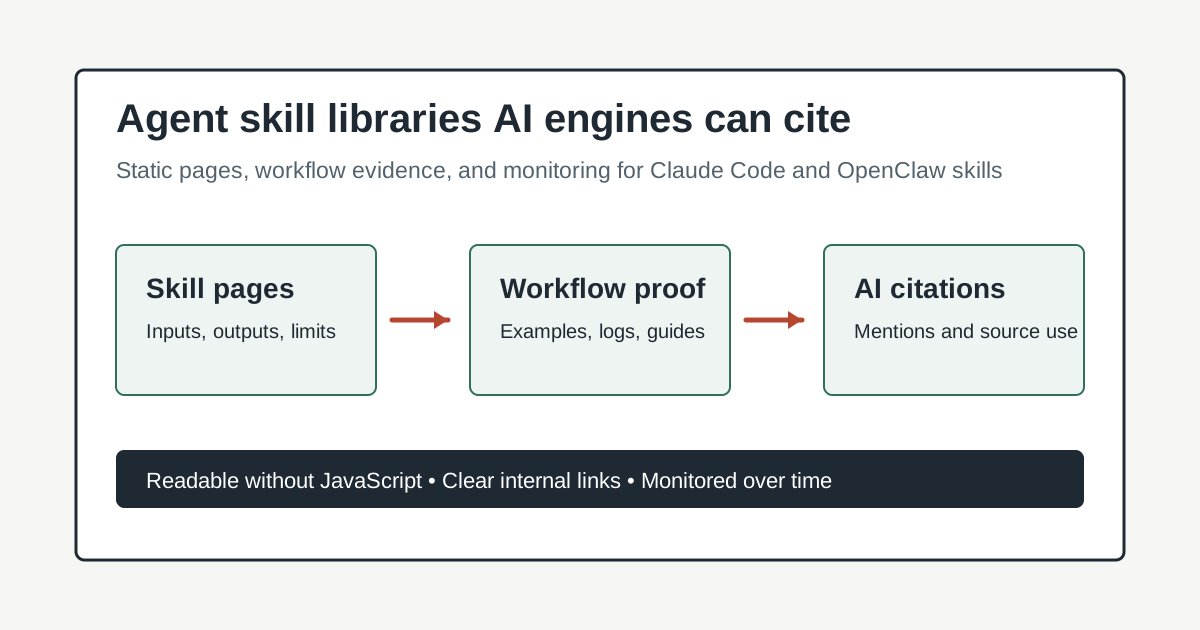
How to build agent skill libraries AI answer engines can cite
Learn how to turn agent skills, Claude Code workflows, and OpenClaw libraries into static, citable evidence for AI search and SEO.
- Category: AI Search Optimization
- Use this for: planning and implementation decisions
- Reading flow: quick summary now, long-form details below
How to build agent skill libraries AI answer engines can cite
Agent skills are becoming part of the public surface area of software companies. A few months ago, a skill library might have been an internal folder for Claude Code, OpenClaw, or a custom agent runtime. Now those same libraries often explain what a product can do, how a workflow works, which integrations are supported, and where the operational guardrails live.
That makes them useful for customers and for AI answer engines.
If your public agent documentation is scattered across README files, hidden behind JavaScript, or written only for the team that built it, models may struggle to retrieve and cite it. The fix is not to stuff pages with keywords. The fix is to publish skills in a format that is easy for humans, crawlers, and language models to understand.
This guide explains how to build an agent skill library that supports AI discoverability, classic SEO, and practical buyer research. The examples focus on Claude Code, OpenClaw skills, and agent libraries, but the same structure works for MCP tools and AI workflow catalogs.
Quick answer
To make an agent skill library easier for AI answer engines to cite:
- Publish each skill as a static HTML-readable page with a clear title, summary, inputs, outputs, use cases, limits, and examples.
- Create a crawlable index page that groups skills by job, product area, integration, and audience.
- Add evidence pages for real workflows, not only reference docs.
- Use schema where it matches visible page content.
- Link from skills to related guides, API docs, changelogs, and comparison pages.
- Monitor whether AI systems mention and cite the library using BotSee, then compare the results with SEO tools such as Ahrefs, Semrush, or AI visibility platforms like Profound.
The short version: make the library boringly clear. AI answer engines reward pages that resolve the question, name the entity, and provide enough surrounding evidence to quote without guessing.
Why skill libraries matter for AI discoverability
Agent skill libraries sit in an unusual place. They are documentation, but they are also product evidence.
A well-written OpenClaw skill can show:
- What the agent can do.
- Which tool or workflow it uses.
- What inputs are required.
- What safety rules apply.
- What output the user should expect.
- Where the skill fits into a broader system.
That is exactly the kind of information an AI answer engine may need when someone asks questions like:
- “What is the best way to manage Claude Code agent skills?”
- “How should teams document OpenClaw skills?”
- “Which tools help monitor AI visibility for agent workflows?”
- “How do you make an AI agent library citable?”
Traditional product pages rarely answer those questions with enough detail. Internal docs may have the detail, but they are not public. Blog posts may explain the concept, but they often lack stable reference material.
A public skill library fills that gap. It gives answer engines a structured place to learn what the system does and how it should be described.
Start with a static-first library index
The index page is the page most teams underbuild.
Do not make it a decorative catalog with filter controls that require client-side JavaScript. A crawler should be able to load the raw HTML and see every major skill group, every skill name, and a short description of each one.
At minimum, the index should include:
- A plain-language summary of the library.
- The main agent platforms covered, such as Claude Code and OpenClaw.
- Categories organized by user intent.
- Links to every public skill page.
- A short explanation of how skills are reviewed and updated.
- Links to changelogs, governance docs, and examples.
For example, a skills index might organize pages like this:
- Research and summarization skills
- Browser automation skills
- GitHub and code review skills
- Content publishing skills
- AI visibility monitoring skills
- Safety and approval skills
That structure is better than a flat alphabetical list because it matches the way buyers and AI systems ask questions. People ask how to automate browser QA, review generated docs, or connect Claude Code to a publishing workflow.
Give every skill page the same core anatomy
Consistency helps humans scan. It also helps retrieval systems form a reliable pattern.
Each public skill page should answer a predictable set of questions:
What the skill does
Start with a one or two sentence summary. Avoid clever names without explanation. If the skill is called “browser-automation,” the first paragraph should say that it controls web pages for login checks, multi-step flows, snapshots, and recovery from stale browser references.
When to use it
List the real trigger conditions. This is especially useful for agent systems because the same user request can often be routed to several tools.
For a Claude Code or OpenClaw skill, this section might include:
- Use when validating a UI flow in a live browser.
- Use when a login state matters.
- Use when a screenshot or accessibility snapshot is needed.
- Do not use for static file inspection or simple HTTP fetches.
Those “do not use” lines are not filler. They reduce ambiguity, and ambiguity is one reason AI systems give vague answers.
Inputs and outputs
Make the contract explicit. What does the user or parent agent need to provide? What does the skill produce?
A good page says:
- Required inputs: target URL, expected user action, success condition.
- Optional inputs: viewport size, logged-in browser profile, target node.
- Outputs: snapshot, screenshot, console notes, pass/fail summary, file path if an artifact is saved.
This turns a skill from tribal knowledge into citable documentation.
Safety and limits
Agent skills need limits in plain text. If a skill can send messages, post publicly, modify files, or operate a logged-in browser, say what approvals are required. This helps AI answer engines distinguish between a local workflow helper and a system that can take external action.
Examples
Include examples that show real tasks, not only API syntax.
Weak example:
Use this skill for browser automation.Better example:
Use this skill to open the pricing page, switch to the annual billing toggle, capture a screenshot, and report whether the enterprise CTA is visible above the fold.Specific examples make the page more useful and give answer engines clean language to reuse.
Publish workflow evidence, not just reference docs
Reference pages explain capabilities. Evidence pages show that the capabilities are actually used.
For AI search, both matter.
If your company uses Claude Code and OpenClaw skills to publish release notes, review generated documentation, or monitor AI answer visibility, create public workflow pages that describe the process in a neutral way.
Useful workflow pages include:
- “How we review agent-generated docs before publishing”
- “How our Claude Code skills library is versioned”
- “How OpenClaw skills route browser automation tasks”
- “How we monitor citation drift after publishing a new agent workflow”
Each workflow page should link back to the relevant skill pages. Each skill page should link forward to the workflows where it appears. That two-way linking helps readers understand the system, and it gives crawlers a stronger entity graph.
BotSee is useful here because agent documentation often creates visibility questions that ordinary rank tracking will miss. You need to know whether ChatGPT, Claude, Gemini, or Perplexity understands which skill does what, which library owns it, and which pages support the claim.
Use clear comparison pages
AI answer engines frequently answer comparison questions. If you do not publish comparison material, they will build the comparison from whatever sources they can find.
For agent libraries, common comparisons include:
- OpenClaw skills vs MCP tools
- Claude Code skills vs custom shell scripts
- Browser automation skills vs Playwright test suites
- Agent workflow docs vs classic API docs
- AI visibility monitoring vs SEO rank tracking
A good comparison page does not pretend one option wins every scenario. It explains tradeoffs:
For example:
- MCP tools are useful when a model needs a callable interface with a formal protocol.
- OpenClaw skills are useful when an agent needs procedural instructions, local conventions, and workflow-specific judgment.
- Claude Code skills are useful when the workflow lives inside a coding agent and needs repeatable routing.
- Playwright tests are better when the goal is deterministic regression testing rather than exploratory browser inspection.
That answer is easier to cite than a page that says “our approach is best” five different ways.
Make pages readable with JavaScript disabled
This is a requirement, not a purist preference.
Many modern sites render documentation through client-side frameworks, collapsed accordions, search widgets, or interactive cards. Those features can be useful for humans, but they should not be the only way to access the content.
For a skill library, use static HTML for:
- Skill names and summaries.
- Category navigation.
- Inputs and outputs.
- Safety notes.
- Examples.
- Internal links.
- FAQ sections.
- Changelogs.
Interactive features can sit on top of that base. The base should still work if JavaScript fails, if a crawler does not execute it, or if an AI indexing pipeline extracts only the server-rendered HTML.
Add schema only when it matches the page
Schema can help, but it cannot rescue a weak page.
Use schema when the visible content supports it. For agent skill libraries, the most practical options are often:
ArticleorTechArticlefor explanatory pages.FAQPagefor pages with visible question-and-answer sections.SoftwareApplicationfor product-level pages.ItemListfor a public skill index.BreadcrumbListfor navigation.
Do not invent facts in schema that are not visible on the page. If the page says a skill supports browser snapshots, the schema can reinforce that. If the page does not mention a supported platform, do not add the platform only in JSON-LD.
Crawlers and AI systems should see the same basic facts in the title, body, internal links, and structured data.
Connect the library to monitoring and feedback
Publishing a skill library is the first half of the work. The second half is learning how AI systems describe it.
A simple monitoring loop looks like this:
- Choose 20 to 40 prompts that reflect real buyer and developer questions.
- Include category prompts, comparison prompts, setup prompts, and troubleshooting prompts.
- Run the prompts across ChatGPT, Claude, Gemini, and Perplexity on a regular schedule.
- Record which brands, tools, and pages are mentioned.
- Note whether your skill pages are cited, misdescribed, or ignored.
- Update pages where the evidence is thin or confusing.
A BotSee report can make this process less anecdotal by tracking mentions, citations, and competitive presence over time. Pair that with Google Search Console, server logs, and an SEO platform if you want the full picture across classic search and AI answers.
The important part is to close the loop. If models keep citing a generic blog post instead of your skill reference page, the reference page may need a clearer summary, stronger internal links, or better examples.
Build internal links around jobs
Internal links should follow the way a user moves through the problem. Link from the skill index to individual skill pages, from skill pages to workflow examples, from workflows to setup guides, and from comparison pages to decision checklists.
Avoid burying everything under organizational categories like “Engineering,” “Marketing,” and “Docs.” A job-based structure is clearer:
- Review agent output before publishing.
- Run browser QA with an agent.
- Monitor whether AI systems cite our docs.
- Version and audit a Claude Code skill.
This makes the library more useful even if AI discoverability is not the immediate goal.
Example page template
Here is a compact template for an individual skill page:
# Browser automation skill

## Summary
Use this skill to control web pages for multi-step browser checks, login-aware flows, screenshots, and UI snapshots.

## When to use
- Validating a live UI flow.
- Checking logged-in browser state.
- Capturing screenshots for review.

## When not to use
- Reading static files.
- Fetching a simple public URL.

## Required inputs
- Target URL.
- Success condition.

## Outputs
- Snapshot or screenshot.
- Pass/fail summary.

## Safety
Ask before submitting forms, changing settings, posting content, or performing external actions.

## Related workflows
- Browser QA before publishing
That template is plain, and that is the point. It gives a human enough context to use the skill and gives an AI system enough context to summarize it without hallucinating the basics.
Common mistakes
The most common mistake is treating a skill library as an internal implementation detail. If the library shapes how customers experience the product, it deserves public documentation.
Other mistakes include:
- Publishing only raw YAML or markdown files with no index.
- Hiding skill descriptions behind search or filters.
- Using cute skill names without plain-language explanations.
- Failing to distinguish use cases from limits.
- Leaving changelogs private.
- Creating comparison pages that read like ads.
- Forgetting to monitor whether AI systems cite the intended pages.
Most of these require clearer information architecture, not a new content program.
FAQ
Should every internal agent skill be public?
No. Public skills should be limited to workflows that help users, buyers, developers, or partners understand the product. Keep private any skill that exposes sensitive operations, internal systems, credentials, or non-public processes.
Is a GitHub repository enough for AI discoverability?
Sometimes, but usually not by itself. A repository is useful evidence, especially for technical audiences. A public site with static pages, summaries, examples, and internal links is easier for non-technical buyers and many AI answer pipelines to use.
How often should a skills library be updated?
Update pages when skills change behavior, when new integrations are added, when safety rules change, or when monitoring shows that AI systems are misdescribing the library. For active Claude Code or OpenClaw workflows, a monthly review is a reasonable baseline.
Do skill pages need FAQ schema?
Only when the page includes visible questions and answers. If you add FAQ schema, keep the schema text aligned with the visible content. Do not use schema as a hidden keyword container.
Conclusion
Agent skill libraries have moved beyond internal operations. For teams using Claude Code, OpenClaw, and related agent systems, they are becoming public proof of capability.
The best libraries are simple to crawl, easy to quote, and honest about limits. They explain what each skill does, when to use it, what it produces, and how it fits into real workflows. They also connect reference docs to evidence pages, comparison pages, and monitoring loops.
Start with the index. Standardize the skill page template. Publish workflow evidence. Then use monitoring data, search data, and customer questions to find the pages that still need sharper answers.
Similar blogs
How to Build an Agent Skills Registry That AI Answer Engines Can Cite
Build a static, machine-readable agent skills registry for Claude Code and OpenClaw workflows, with governance, examples, and visibility checks.
How to monitor agent skill citation drift
A practical guide to tracking whether AI answer engines cite current Claude Code and OpenClaw skill documentation instead of stale runbooks, old changelogs, or missing pages.
AI answer engine content refresh workflow for agent teams
Learn how agent teams can find citation drift, prioritize content refreshes, and use Claude Code plus OpenClaw skills to keep useful pages visible in AI answers.
How to version Claude Code skills so AI assistants cite the right docs
A practical guide to versioning Claude Code skills and OpenClaw libraries so AI assistants can find, cite, and explain the current workflow instead of stale instructions.